
Anchor Boxes
Object detection algorithms usually sample a large number of regions in the input image, determine whether these regions contain objects of interest, and adjust the boundaries of the regions so as to predict the ground-truth bounding boxes of the objects more accurately. Different models may adopt different region sampling schemes. Here we introduce one of such methods: it generates multiple bounding boxes with varying scales and aspect ratios centered on each pixel. These bounding boxes are called anchor boxes. We will design an object detection model based on anchor boxes in :numref:sec_ssd.
First, let's modify the printing accuracy just for more concise outputs.
using Pkg;
Pkg.activate("../../d2lai")
using d2lai, Flux, Images, CUDA, Plots
using StatsBase
Activating project at `~/d2l-julia/d2lai`Generating Multiple Anchor Boxes
Suppose that the input image has a height of
To generate multiple anchor boxes with different shapes, let's set a series of scales
(
That is to say, the number of anchor boxes centered on the same pixel is
The above method of generating anchor boxes is implemented in the following multibox_prior function. We specify the input image, a list of scales, and a list of aspect ratios, then this function will return all the anchor boxes.
function multibox_prior(data, sizes, ratio)
    device = isa(data, CuArray) ? gpu : cpu
    in_height, in_width = size(data)[1:2]
    num_sizes, num_ratios = length(sizes), length(ratio)
    boxes_per_pixel = (num_sizes + num_ratios - 1)
    offset_h, offset_w = 0.5, 0.5
    steps_h = 1.0 / in_height  # Scaled steps in y axis
    steps_w = 1.0 / in_width  # Scaled steps in x axis

    center_h = (collect(0:in_height-1) .+ offset_h).*steps_h
    center_w = (collect(0:in_width-1) .+ offset_w).*steps_w

    shift_y, shift_x = center_h' .* ones(length(center_w)), ones(length(center_h))' .* center_w
    shift_y, shift_x = vec(shift_y), vec(shift_x)

    w = vcat(
        sizes .* sqrt.(ratio[1:1]), sizes[1:1] .* sqrt.(ratio[2:end])
    )
    h = vcat(
        sizes ./ sqrt.(ratio[1:1]), sizes[1:1] ./ sqrt.(ratio[2:end])
    )
    anchor_manipulations = stack([-w, -h, w, h]) ./ 2
    anchor_manipulations = repeat(anchor_manipulations, in_height*in_width, 1)
    out_grid = stack([shift_x, shift_y, shift_x, shift_y])
    out_grid = repeat(out_grid, inner = (boxes_per_pixel, 1)) |> device
    Y = out_grid .+ anchor_manipulations
    Flux.unsqueeze(Y, dims = 3)
end
multibox_prior (generic function with 1 method)We can see that the shape of the returned anchor box variable Y is (number of anchor boxes, 4, batch_size).
img = load("../img/catdog.jpg")
h, w = size(img) # 561, 728

print(h, w)
X = rand(h, w, 3, 1) |> gpu  # Construct input data
Y = multibox_prior(X, gpu([0.75, 0.5, 0.25]), gpu([1, 2, 0.5]))
size(Y)
561728
(2042040, 4, 1)After changing the shape of the anchor box variable Y to (image height, image width, number of anchor boxes centered on the same pixel, 4), we can obtain all the anchor boxes centered on a specified pixel position. In the following, we access the first anchor box centered on (250, 250). It has four elements: the
Y_reshaped = reshape(Y, 5, h, w, 4) |> cpu
Y_reshaped = permutedims(Y_reshaped, (2, 3, 1, 4))
Y_reshaped[250, 250, 1, :]
4-element Vector{Float32}:
-0.15178572
-0.031862736
0.59821427
0.71813726In order to show all the anchor boxes centered on one pixel in the image, we define the following show_bboxes function to draw multiple bounding boxes on the image.
function show_bboxes(plt, bboxes; labels = nothing, colors = [])
    default_colors = [:blue, :green, :red, :yellow, :orange]
    colors = isempty(colors) ? default_colors : colors
    for (i, bbox) in enumerate(eachslice(bboxes, dims = 1))
        color = colors[i % length(colors) + 1]
        plt = if isnothing(labels)
            d2lai.bbox_to_rect(plt, bbox, color)
        else
            d2lai.bbox_to_rect(plt, bbox, color, labels[i])
        end
    end
    plt
end
show_bboxes (generic function with 1 method)As we just saw, the coordinate values of the boxes have been divided by the width and height of the image, respectively. When drawing anchor boxes, we need to restore their original coordinate values; thus, we define variable bbox_scale below. Now, we can draw all the anchor boxes centered on (250, 250) in the image. As you can see, the blue anchor box with a scale of 0.75 and an aspect ratio of 1 well surrounds the dog in the image.
plt = plot(img)
bbox_scale = reshape([w, h, w, h], 1, :)
show_bboxes(plt,
    Y_reshaped[250, 250, :, :] .* bbox_scale;
    labels = (
        "s=0.75, r=1", "s=0.5, r=1", "s=0.25, r=1", "s=0.75, r=2",
             "s=0.75, r=0.5")
)
Intersection over Union (IoU)
We just mentioned that an anchor box "well" surrounds the dog in the image. If the ground-truth bounding box of the object is known, how can "well" here be quantified? Intuitively, we can measure the similarity between the anchor box and the ground-truth bounding box. We know that the Jaccard index can measure the similarity between two sets. Given sets
In fact, we can consider the pixel area of any bounding box as a set of pixels. In this way, we can measure the similarity of the two bounding boxes by the Jaccard index of their pixel sets. For two bounding boxes, we usually refer their Jaccard index as intersection over union (IoU), which is the ratio of their intersection area to their union area, as shown in Figure. The range of an IoU is between 0 and 1: 0 means that two bounding boxes do not overlap at all, while 1 indicates that the two bounding boxes are equal. 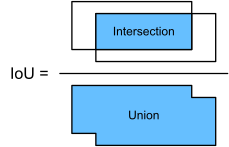
IoU is the ratio of the intersection area to the union area of two bounding boxes.
For the remainder of this section, we will use IoU to measure the similarity between anchor boxes and ground-truth bounding boxes, and between different anchor boxes. Given two lists of anchor or bounding boxes, the following box_iou computes their pairwise IoU across these two lists.
function box_iou(boxes1, boxes2)
    # Helper function: area = (xmax - xmin) * (ymax - ymin)
    function box_area(boxes)
        (boxes[:, 3] .- boxes[:, 1]) .* (boxes[:, 4] .- boxes[:, 2])
    end

    areas1 = box_area(boxes1)  # shape: (n1,)
    areas2 = box_area(boxes2)  # shape: (n2,)

    n1 = size(boxes1, 1)
    n2 = size(boxes2, 1)

    inter_top_left = max.(
        reshape(boxes1[:, 1:2], n1, 1, 2),   # broadcast to (n1, n2, 2)
        reshape(boxes2[:, 1:2], 1, n2, 2)
    )
    inter_bot_right = min.(
        reshape(boxes1[:, 3:4], n1, 1, 2),
        reshape(boxes2[:, 3:4], 1, n2, 2)
    )

    inter_wh = max.(inter_bot_right .- inter_top_left, 0.0f0)  # (n1, n2, 2)
    inter_areas = inter_wh[:, :, 1:1] .* inter_wh[:, :, 2:2]       # (n1, n2)

    union_areas = reshape(areas1, :, 1) .+ reshape(areas2, 1, :) .- inter_areas

    return inter_areas ./ union_areas  # shape: (n1, n2)
end
box_iou (generic function with 1 method)Labeling Anchor Boxes in Training Data
In a training dataset, we consider each anchor box as a training example. In order to train an object detection model, we need class and offset labels for each anchor box, where the former is the class of the object relevant to the anchor box and the latter is the offset of the ground-truth bounding box relative to the anchor box. During the prediction, for each image we generate multiple anchor boxes, predict classes and offsets for all the anchor boxes, adjust their positions according to the predicted offsets to obtain the predicted bounding boxes, and finally only output those predicted bounding boxes that satisfy certain criteria.
As we know, an object detection training set comes with labels for locations of ground-truth bounding boxes and classes of their surrounded objects. To label any generated anchor box, we refer to the labeled location and class of its assigned ground-truth bounding box that is closest to the anchor box. In the following, we describe an algorithm for assigning closest ground-truth bounding boxes to anchor boxes.
Assigning Ground-Truth Bounding Boxes to Anchor Boxes
Given an image, suppose that the anchor boxes are
Find the largest element in matrix
and denote its row and column indices as and , respectively. Then the ground-truth bounding box is assigned to the anchor box . This is quite intuitive because and are the closest among all the pairs of anchor boxes and ground-truth bounding boxes. After the first assignment, discard all the elements in the row and the column in matrix . Find the largest of the remaining elements in matrix
and denote its row and column indices as and , respectively. We assign ground-truth bounding box to anchor box and discard all the elements in the row and the column in matrix . At this point, elements in two rows and two columns in matrix
have been discarded. We proceed until all elements in columns in matrix are discarded. At this time, we have assigned a ground-truth bounding box to each of anchor boxes. Only traverse through the remaining
anchor boxes. For example, given any anchor box , find the ground-truth bounding box with the largest IoU with throughout the row of matrix , and assign to only if this IoU is greater than a predefined threshold.
Let's illustrate the above algorithm using a concrete example. As shown in Figure (left), assuming that the maximum value in matrix 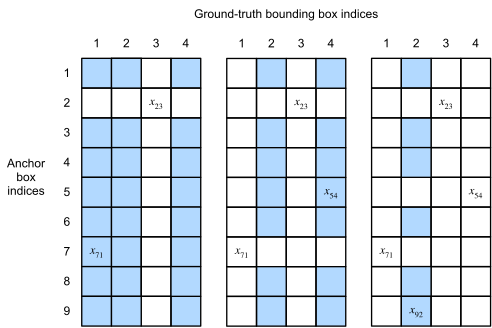
Assigning ground-truth bounding boxes to anchor boxes.
This algorithm is implemented in the following assign_anchor_to_bbox function.
function assign_anchor_to_bbox(ground_truth, anchors, iou_threshold; device = cpu)
    num_anchors, num_gt_boxes = size(anchors, 1), size(ground_truth, 1)
    jaccard = box_iou(anchors, ground_truth)
    anchors_bbox_map = fill(-1., num_anchors) |> device
    max_ious, indices = findmax(jaccard, dims = 2)
    max_ious = vec(max_ious)
    indices = getindex.(indices, 2)
    anc_i = findall(max_ious .>= iou_threshold)
    box_j = indices[max_ious .>= iou_threshold]
    anchors_bbox_map[anc_i] .= box_j
    col_discard = fill(-1, num_anchors)
    row_discard = fill(-1, num_gt_boxes)
    for _ in 1:num_gt_boxes
        max_idx = argmax(jaccard)
        anc_idx = max_idx[1]
        box_idx = max_idx[2]
        anchors_bbox_map[anc_idx:anc_idx] = box_idx
        jaccard[:, box_idx:box_idx] = col_discard
        jaccard[anc_idx:anc_idx, :] = row_discard
    end
    anchors_bbox_map
end
assign_anchor_to_bbox (generic function with 1 method)Labeling Classes and Offsets
Now we can label the class and offset for each anchor box. Suppose that an anchor box
**] where default values of the constants are offset_boxes function.
function offset_boxes(anchors, assigned_bb, eps = 1e-6)
    c_anc = d2lai.box_corner_to_center(anchors)
    c_assigned_bb = d2lai.box_corner_to_center(assigned_bb)
    offset_xy = 10 .* (c_assigned_bb[:, 1:2] - c_anc[:, 1:2]) ./ c_anc[:, 3:4]
    offset_wh = 5 * log.(eps .+ c_assigned_bb[:, 3:end] ./ c_anc[:, 3:end])
    return cat(offset_xy, offset_wh; dims = 2)
end
offset_boxes (generic function with 2 methods)If an anchor box is not assigned a ground-truth bounding box, we just label the class of the anchor box as "background". Anchor boxes whose classes are background are often referred to as negative anchor boxes, and the rest are called positive anchor boxes. We implement the following multibox_target function to label classes and offsets for anchor boxes the anchors argument using ground-truth bounding boxes (the labels argument). This function sets the background class to zero and increments the integer index of a new class by one.
function multibox_target(anchors, labels, device = cpu; iou_threshold = 0.5)
    batch_size = size(labels) |> last
    anchors = dropdims(anchors; dims = 3)
    num_anchors = size(anchors, 1)
    out = map(1:batch_size) do i
        label = labels[:, :, i]
        gt_labels = label[:, 1]
        # assigns each anchor to a ground truth bounding box
        anchors_bbox_map = assign_anchor_to_bbox(label[:, 2:end], anchors, iou_threshold; device = device) .|> Int
        # the class for each anchor is basically the class of assigned bounding box.
        # If the box is not assigned, the class is 0.

        # assign zeros of size num anchors by default
        anchor_box_classes = zeros(num_anchors) |> device
        # lhs: get elements of the preallocated array only for the anchors that are assigned
        # rhs: get elements of gt_labels for bounding boxes that are assigned to anchors
        anchor_box_classes[anchors_bbox_map .> 0] = gt_labels[anchors_bbox_map[anchors_bbox_map .> 0]] .+ 1

        assigned_bbox = zeros(num_anchors, 4) |> device
        assigned_bbox[anchors_bbox_map .> 0, :] = label[anchors_bbox_map[anchors_bbox_map .> 0], 2:end]

        bbox_mask = reshape(Int.(anchors_bbox_map .>= 0), num_anchors, 1)
        offset = offset_boxes(anchors, assigned_bbox) .* bbox_mask
        offset = reduce(vcat, eachrow(offset))
        offset, repeat(bbox_mask, inner = (4,1)), anchor_box_classes
    end
    offset, assigned_bbox, class_labels = getindex.(out, 1), getindex.(out, 2), getindex.(out, 3)
    reduce(hcat, offset), reduce(hcat, assigned_bbox), reduce(hcat, class_labels)
end
multibox_target (generic function with 2 methods)An Example
Let's illustrate anchor box labeling via a concrete example. We define ground-truth bounding boxes for the dog and cat in the loaded image, where the first element is the class (0 for dog and 1 for cat) and the remaining four elements are the
ground_truth = [
    0    0.1   0.08  0.52  0.92;
    1    0.55  0.2   0.9   0.88
]

anchors = [
    0.0   0.1   0.2   0.3;
    0.15  0.2   0.4   0.4;
    0.63  0.05  0.88  0.98;
    0.66  0.45  0.8   0.8;
    0.57  0.3   0.92  0.9
]

plt = plot(img)
plt = show_bboxes(plt, ground_truth[:, 2:end].*bbox_scale; labels = ["dog", "cat"])
plt = show_bboxes(plt, anchors.*bbox_scale; labels = string.(1:5))
Using the multibox_target function defined above, we can [label classes and offsets of these anchor boxes based on the ground-truth bounding boxes] for the dog and cat. In this example, indices of the background, dog, and cat classes are 0, 1, and 2, respectively. Below we add an dimension for examples of anchor boxes and ground-truth bounding boxes.
labels = multibox_target(
    gpu(Flux.unsqueeze(anchors, dims = 3)),
    gpu(Flux.unsqueeze(ground_truth, dims = 3)), gpu)
([-0.0; -0.0; … ; 4.105928642092345e-6; 0.6258206173941125;;], [0; 0; … ; 1; 1;;], Float32[0.0; 1.0; … ; 0.0; 2.0;;])There are three items in the returned result, all of which are in the tensor format. The third item contains the labeled classes of the input anchor boxes.
Let's analyze the returned class labels below based on anchor box and ground-truth bounding box positions in the image. First, among all the pairs of anchor boxes and ground-truth bounding boxes, the IoU of the anchor box
labels[3]5×1 CuArray{Float32, 2, CUDA.DeviceMemory}:
0.0
1.0
2.0
0.0
2.0The second returned item is a mask variable of the shape (four times the number of anchor boxes, batch size). Every four elements in the mask variable correspond to the four offset values of each anchor box. Since we do not care about background detection, offsets of this negative class should not affect the objective function. Through elementwise multiplications, zeros in the mask variable will filter out negative class offsets before calculating the objective function.
labels[2]20×1 CuArray{Int64, 2, CUDA.DeviceMemory}:
0
0
0
0
1
1
1
1
1
1
1
1
0
0
0
0
1
1
1
1The first returned item contains the four offset values labeled for each anchor box. Note that the offsets of negative-class anchor boxes are labeled as zeros.
labels[1]20×1 CuArray{Float64, 2, CUDA.DeviceMemory}:
-0.0
-0.0
-0.0
-0.0
1.3999998569488525
9.999999046325684
2.5939717871581154
7.175424157520539
-1.1999988555908203
0.26881757378578186
1.6823642436367439
-1.5654519789398522
-0.0
-0.0
-0.0
-0.0
-0.5714280009269714
-1.0000001192092896
4.105928642092345e-6
0.6258206173941125Predicting Bounding Boxes with Non-Maximum Suppression
During prediction, we generate multiple anchor boxes for the image and predict classes and offsets for each of them. A predicted bounding box is thus obtained according to an anchor box with its predicted offset. Below we implement the offset_inverse function that takes in anchors and offset predictions as inputs and [applies inverse offset transformations to return the predicted bounding box coordinates].
function offset_inverse(anchors, offset_pred)
    anc = d2lai.box_corner_to_center(anchors)  # (num_anchors, 4)
    pred_xy = (offset_pred[:, 1:2] .* anc[:, 3:4]) ./ 10.0 .+ anc[:, 1:2]
    pred_wh = exp.(offset_pred[:, 3:4] ./ 5.0) .* anc[:, 3:4]
    pred_center = hcat(pred_xy, pred_wh)
    return d2lai.boxes_center_to_corner(pred_center)
end
offset_inverse (generic function with 1 method)When there are many anchor boxes, many similar (with significant overlap) predicted bounding boxes can be potentially output for surrounding the same object. To simplify the output, we can merge similar predicted bounding boxes that belong to the same object by using non-maximum suppression (NMS).
Here is how non-maximum suppression works. For a predicted bounding box
Select the predicted bounding box
with the highest confidence from as a basis and remove all non-basis predicted bounding boxes whose IoU with exceeds a predefined threshold from . At this point, keeps the predicted bounding box with the highest confidence but drops others that are too similar to it. In a nutshell, those with non-maximum confidence scores are suppressed. Select the predicted bounding box
with the second highest confidence from as another basis and remove all non-basis predicted bounding boxes whose IoU with exceeds from . Repeat the above process until all the predicted bounding boxes in
have been used as a basis. At this time, the IoU of any pair of predicted bounding boxes in is below the threshold ; thus, no pair is too similar with each other. Output all the predicted bounding boxes in the list
.
The following nms function sorts confidence scores in descending order and returns their indices.
function nms(boxes, scores, iou_threshold)
    B = sortperm(scores; rev=true) |> cpu
    boxes = boxes |> cpu
    keep = []
    keep_idx = Int[]

    while !isempty(B)
        i = B[1]
        push!(keep_idx, i)
        length(B) == 1 && break
        ious = d2lai.box_iou(view(boxes, i:i, :), view(boxes, B[2:end], :))
        ious_vec = vec(ious)
        mask = ious_vec .<= iou_threshold
        B = B[findall(mask) .+ 1]  # skip current top index
    end

    return keep_idx
end
nms (generic function with 1 method)We define the following multibox_detection to [apply non-maximum suppression to predicting bounding boxes]. Do not worry if you find the implementation a bit complicated: we will show how it works with a concrete example right after the implementation.
function multibox_detection(cls_probs, offset_preds, anchors; nms_threshold = 0.5, pos_threshold =1e-6)
    device = isa(cls_probs, CuArray) ? gpu : cpu
    num_anchors = size(anchors, 1)
    batch_size = size(cls_probs)[end]
    out = map(1:batch_size) do b
        cls_prob, offset_pred = cls_probs[:, :, b], reshape(offset_preds[:, b], 4, :)
        offset_pred = permutedims(offset_pred, (2,1))
        cls_prob_fg = cls_prob[2:end, :]  # remove background (class 0)
        conf, class_id = maximum(cls_prob_fg; dims = 1), getindex.(argmax(cls_prob_fg, dims = 1), 1) .+ 1
        predicted_bb = offset_inverse(anchors, offset_pred)
        keep = nms(predicted_bb, vec(conf), 0.5) |> cpu
        all_idx = collect(1:num_anchors) |> cpu
        combined = vcat(keep, all_idx) |> cpu
        counts = countmap(combined)
        non_keep = [i for (i, c) in counts if c == 1]

        # Order: keep first, then non-keep
        all_sorted = vcat(keep, non_keep)
        class_out = copy(class_id)
        class_out[non_keep] .= -1  # background
        class_out = class_out[all_sorted]
        conf_out = conf[all_sorted]
        bb_out = predicted_bb[all_sorted, :]

        # Threshold low confidence predictions
        low_conf_mask = conf_out .< pos_threshold
        class_out[low_conf_mask] .= -1
        conf_out[low_conf_mask] .= 1 .- conf_out[low_conf_mask]

        hcat(Float32.(class_out), conf_out, bb_out)

    end

end
multibox_detection (generic function with 1 method)Now let's apply the above implementations to a concrete example with four anchor boxes. For simplicity, we assume that the predicted offsets are all zeros. This means that the predicted bounding boxes are anchor boxes. For each class among the background, dog, and cat, we also define its predicted likelihood.
anchors = reduce(vcat, ([0.1 0.08 0.52 0.92], [0.08 0.2 0.56 0.95],
                      [0.15 0.3 0.62 0.91], [0.55 0.2 0.9 0.88]))
offset_preds = zeros(4, 4)
cls_probs = reduce(vcat, (zeros(1, 4),  # Predicted background likelihood
                      [0.9 0.8 0.7 0.1],  # Predicted dog likelihood
                      [0.1 0.2 0.3 0.9]))
3×4 Matrix{Float64}:
0.0 0.0 0.0 0.0
0.9 0.8 0.7 0.1
0.1 0.2 0.3 0.9We can plot these predicted bounding boxes with their confidence on the image.
plt = plot(img)
show_bboxes(plt, anchors .* bbox_scale; labels = ["dog=0.9", "dog=0.8", "dog=0.7", "cat=0.9"])output = multibox_detection(Flux.unsqueeze(cls_probs; dims = 3),
Flux.unsqueeze(offset_preds; dims = 3),
Flux.unsqueeze(anchors; dims = 3),
nms_threshold=0.5)
output[1]4×6 Matrix{Float64}:
2.0 0.9 0.1 0.08 0.52 0.92
3.0 0.9 0.55 0.2 0.9 0.88
-1.0 0.8 0.08 0.2 0.56 0.95
-1.0 0.7 0.15 0.3 0.62 0.91After removing those predicted bounding boxes of class -1, we can output the final predicted bounding box kept by non-maximum suppression.
plt = plot(img)
for row in eachrow(output[1])
    if row[1] < 0
        continue
    else
        label_name = row[1] == 2 ? "dog" : "cat"
        plt = show_bboxes(plt, reshape(row[3:end], 1, :).*bbox_scale; labels = ["$label_name = $(row[2])"])
    end
end
plt
In practice, we can remove predicted bounding boxes with lower confidence even before performing non-maximum suppression, thereby reducing computation in this algorithm. We may also post-process the output of non-maximum suppression, for example, by only keeping results with higher confidence in the final output.
Summary
We generate anchor boxes with different shapes centered on each pixel of the image.
Intersection over union (IoU), also known as Jaccard index, measures the similarity of two bounding boxes. It is the ratio of their intersection area to their union area.
In a training set, we need two types of labels for each anchor box. One is the class of the object relevant to the anchor box and the other is the offset of the ground-truth bounding box relative to the anchor box.
During prediction, we can use non-maximum suppression (NMS) to remove similar predicted bounding boxes, thereby simplifying the output.
Exercises
Change values of
sizesandratiosin themultibox_priorfunction. What are the changes to the generated anchor boxes?Construct and visualize two bounding boxes with an IoU of 0.5. How do they overlap with each other?
Modify the variable
anchorsin :numref:subsec_labeling-anchor-boxesand :numref:subsec_predicting-bounding-boxes-nms. How do the results change?Non-maximum suppression is a greedy algorithm that suppresses predicted bounding boxes by removing them. Is it possible that some of these removed ones are actually useful? How can this algorithm be modified to suppress softly? You may refer to Soft-NMS [202].
Rather than being hand-crafted, can non-maximum suppression be learned?