
Semantic Segmentation and the Dataset
When discussing object detection tasks in :numref:sec_bbox–:numref:sec_rcnn, rectangular bounding boxes are used to label and predict objects in images. This section will discuss the problem of semantic segmentation, which focuses on how to divide an image into regions belonging to different semantic classes. Different from object detection, semantic segmentation recognizes and understands what are in images in pixel level: its labeling and prediction of semantic regions are in pixel level. Figure shows the labels of the dog, cat, and background of the image in semantic segmentation. Compared with in object detection, the pixel-level borders labeled in semantic segmentation are obviously more fine-grained. 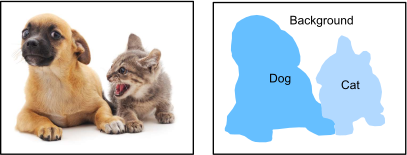
Labels of the dog, cat, and background of the image in semantic segmentation.
Image Segmentation and Instance Segmentation
There are also two important tasks in the field of computer vision that are similar to semantic segmentation, namely image segmentation and instance segmentation. We will briefly distinguish them from semantic segmentation as follows.
Image segmentation divides an image into several constituent regions. The methods for this type of problem usually make use of the correlation between pixels in the image. It does not need label information about image pixels during training, and it cannot guarantee that the segmented regions will have the semantics that we hope to obtain during prediction. Taking the image in Figure as input, image segmentation may divide the dog into two regions: one covers the mouth and eyes which are mainly black, and the other covers the rest of the body which is mainly yellow.
Instance segmentation is also called simultaneous detection and segmentation. It studies how to recognize the pixel-level regions of each object instance in an image. Different from semantic segmentation, instance segmentation needs to distinguish not only semantics, but also different object instances. For example, if there are two dogs in the image, instance segmentation needs to distinguish which of the two dogs a pixel belongs to.
The Pascal VOC2012 Semantic Segmentation Dataset
On of the most important semantic segmentation dataset is Pascal VOC2012 In the following, we will take a look at this dataset.
using Pkg;
Pkg.activate("../../d2lai")
using d2lai, Images, DataAugmentation
using Serialization, Flux
Activating project at `~/d2l-julia/d2lai`The tar file of the dataset is about 2 GB, so it may take a while to download the file. The extracted dataset path will be given by extracted_folder.
file = d2lai._download("VOCtrainval_11-May-2012.tar")
extracted_folder = d2lai._extract(file)"/tmp/jl_Z4uTBK"After entering the path <extracted_folder>/VOCdevkit/VOC2012, we can see the different components of the dataset. The ImageSets/Segmentation path contains text files that specify training and test samples, while the JPEGImages and SegmentationClass paths store the input image and label for each example, respectively. The label here is also in the image format, with the same size as its labeled input image. Besides, pixels with the same color in any label image belong to the same semantic class. The following defines the read_voc_images function to read all the input images and labels into the memory.
function read_voc_images(extracted_folder; train = true)
    txt_file =  train ? "train.txt" : "val.txt"
    voc_dir = joinpath(extracted_folder, "VOCdevkit/VOC2012")
    txt_fname = joinpath(voc_dir, "ImageSets", "Segmentation", txt_file)
    lines = readlines(txt_fname)
    feature_imgs = map(lines) do img_name
        img = Images.load(joinpath(voc_dir, "JPEGImages", "$img_name.jpg"))
    end
    labels = map(lines) do img_name
        img = Images.load(joinpath(voc_dir, "SegmentationClass", "$img_name.png"))
    end
    feature_imgs, labels
end
read_voc_images (generic function with 1 method)We draw the first five input images and their labels. In the label images, white and black represent borders and background, respectively, while the other colors correspond to different classes.
train_features, train_labels = read_voc_images(extracted_folder)

d2lai.show_images(vcat(train_features[1:5], train_labels[1:5]), 2, 5)
VOC_COLORMAP = [[0, 0, 0], [128, 0, 0], [0, 128, 0], [128, 128, 0],
                [0, 0, 128], [128, 0, 128], [0, 128, 128], [128, 128, 128],
                [64, 0, 0], [192, 0, 0], [64, 128, 0], [192, 128, 0],
                [64, 0, 128], [192, 0, 128], [64, 128, 128], [192, 128, 128],
                [0, 64, 0], [128, 64, 0], [0, 192, 0], [128, 192, 0],
                [0, 64, 128]]

VOC_CLASSES = ["background", "aeroplane", "bicycle", "bird", "boat",
               "bottle", "bus", "car", "cat", "chair", "cow",
               "diningtable", "dog", "horse", "motorbike", "person",
               "potted plant", "sheep", "sofa", "train", "tv/monitor"];
With the two constants defined above, we can conveniently [find the class index for each pixel in a label]. We define the voc_colormap2label function to build the mapping from the above RGB color values to class indices, and the voc_label_indices function to map any RGB values to their class indices in this Pascal VOC2012 dataset.
function voc_colormap2label()
    colormap2label = fill(0, 256^3)
    for (i, cmap) in enumerate(VOC_COLORMAP)
        r, g, b = cmap
        index = (r * 256 + g) * 256 + b + 1
        colormap2label[index] = i - 1
    end
    return colormap2label
end
function voc_label_indices(colormap, colormap2label)
    h, w = size(colormap, 1), size(colormap, 2)
    idx = Array{Int}(undef, h, w)

    @inbounds for j in 1:w, i in 1:h
        r = colormap[i, j, 1]
        g = colormap[i, j, 2]
        b = colormap[i, j, 3]
        index = (r * 256 + g) * 256 + b + 1
        idx[i, j] = colormap2label[index]
    end

    return idx
end
voc_label_indices (generic function with 1 method)For example, in the first example image, the class index for the front part of the airplane is 1, while the background index is 0.
tl = apply(ImageToTensor(), Image(train_labels[1])) |> itemdata |> collect
tl = Int.(tl .* 255)
y = voc_label_indices(tl, voc_colormap2label())
y[106:116, 131:141], VOC_CLASSES[1]
([0 0 … 0 0; 0 0 … 0 0; … ; 1 1 … 0 0; 1 1 … 0 0], "background")Data Preprocessing
In previous experiments such as in :numref:sec_alexnet–:numref:sec_googlenet, images are rescaled to fit the model's required input shape. However, in semantic segmentation, doing so requires rescaling the predicted pixel classes back to the original shape of the input image. Such rescaling may be inaccurate, especially for segmented regions with different classes. To avoid this issue, we crop the image to a fixed shape instead of rescaling. Specifically, [**using random cropping from image augmentation, we crop the same area of the input image and the label.
function voc_rand_corp(feature, label, ht, width)
    tfm = DataAugmentation.compose(RandomCrop((ht, width)), ImageToTensor())
    randstate = DataAugmentation.getrandstate(tfm)
    feature_ = apply(tfm, Image(feature); randstate) |> itemdata |> collect
    label_ = apply(tfm, Image(label); randstate) |> itemdata |> collect
    feature_, label_
end
voc_rand_corp (generic function with 1 method)imgs = map(1:5) do _
voc_rand_corp(train_features[1], train_labels[1], 200, 300)
end
imgs = reduce(vcat, collect.(imgs))
d2lai.show_images(imgs, 5, 2)
Custom Semantic Segmentation Dataset Class
We define a custom semantic segmentation dataset class VOCSegDataset by inheriting the Dataset class provided by high-level APIs. By implementing the __getitem__ function, we can arbitrarily access the input image indexed as idx in the dataset and the class index of each pixel in this image. Since some images in the dataset have a smaller size than the output size of random cropping, these examples are filtered out by a custom filter function. In addition, we also define the normalize_image function to standardize the values of the three RGB channels of input images.
struct VOCSegDataSet{T, V, A} <: d2lai.AbstractData
    train::T
    val::V
    args::A
end

__filter_size(img, sz) = size(img, 1) >= sz[1] && size(img, 2) >= sz[2]

function VOCSegDataSet(crop_size; batchsize = 64)
    file = d2lai._download("VOCtrainval_11-May-2012.tar")
    extracted_folder = d2lai._extract(file)
    train_features, train_labels = read_voc_images(extracted_folder; train = true)
    val_features, val_labels = read_voc_images(extracted_folder; train = false)

    colormap2label = voc_colormap2label()

    train_features = filter(f -> __filter_size(f, crop_size), train_features)
    train_labels = filter(f -> __filter_size(f, crop_size), train_labels)

    val_features = filter(f -> __filter_size(f, crop_size), val_features)
    val_labels = filter(f -> __filter_size(f, crop_size), val_labels)

    corped_train = voc_rand_corp.(train_features, train_labels, Ref(crop_size[1]), Ref(crop_size[2]))
    corped_val = voc_rand_corp.(val_features, val_labels, Ref(crop_size[1]), Ref(crop_size[2]))

    train_features, train_labels = first.(corped_train), last.(corped_train)
    val_features, val_labels = first.(corped_val), last.(corped_val)

    train_labels = map(l -> Int.(l .* 255), train_labels)
    val_labels = map(l -> Int.(l .* 255), val_labels)

    train_labels = voc_label_indices.(train_labels, Ref(colormap2label))
    val_labels = voc_label_indices.(val_labels, Ref(colormap2label))

    train_features, train_labels = stack(train_features; dims = 4), stack(train_labels; dims = 3)
    val_features, val_labels = stack(val_features; dims = 4), stack(val_labels; dims = 3)

    VOCSegDataSet(
        (train_features, train_labels),
        (val_features, val_labels),
        (; colormap2label, crop_size, batchsize)
    )
end

function d2lai.get_dataloader(data::VOCSegDataSet; train = true)
    if train
        return Flux.DataLoader(data.train; shuffle = true, batchsize = data.args.batchsize)
    else
        return Flux.DataLoader(data.val; shuffle = false, batchsize = data.args.batchsize)
    end
end
Reading the Dataset
We use the custom VOCSegDataset class to create instances of the training set and test set, respectively. Suppose that we specify that the output shape of randomly cropped images is
We have already set the batch size to 32, we define the data iterator for the training set. Let's print the shape of the first minibatch. Different from in image classification or object detection, labels here are three-dimensional arrays.
data = VOCSegDataSet((320, 480); batchsize = 32);

train_iter =  get_dataloader(data)
test_iter = get_dataloader(data; train = false)
34-element DataLoader(::Tuple{Array{Float32, 4}, Array{Int64, 3}}, batchsize=32)
with first element:
(480×320×3×32 Array{Float32, 4}, 480×320×32 Array{Int64, 3},)Putting It All Together
Finally, we define the following load_data_voc function to download and read the Pascal VOC2012 semantic segmentation dataset. It returns data iterators for both the training and test datasets.
function load_data_voc(data::VOCSegDataSet)
    train_iter =  get_dataloader(data)
    test_iter = get_dataloader(data; train = false)
    return train_iter, test_iter
end
load_data_voc (generic function with 1 method)Summary
Semantic segmentation recognizes and understands what are in an image in pixel level by dividing the image into regions belonging to different semantic classes.
One of the most important semantic segmentation dataset is Pascal VOC2012.
In semantic segmentation, since the input image and label correspond one-to-one on the pixel, the input image is randomly cropped to a fixed shape rather than rescaled.
Exercises
How can semantic segmentation be applied in autonomous vehicles and medical image diagnostics? Can you think of other applications?
Recall the descriptions of data augmentation in :numref:
sec_image_augmentation. Which of the image augmentation methods used in image classification would be infeasible to be applied in semantic segmentation?