
Padding and Stride
Recall the example of a convolution in Figure. The input had both a height and width of 3 and the convolution kernel had both a height and width of 2, yielding an output representation with dimension
In the following we will explore a number of techniques, including padding and strided convolutions, that offer more control over the size of the output. As motivation, note that since kernels generally have width and height greater than
using Pkg; Pkg.activate("d2lai")
using d2lai, Flux
Activating project at `~/Projects/D2L/d2lai`Padding
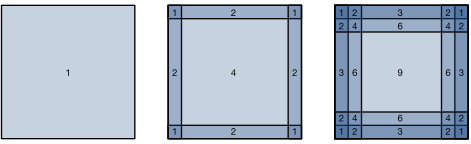
As described above, one tricky issue when applying convolutional layers is that we tend to lose pixels on the perimeter of our image. Consider :numref:img_conv_reuse that depicts the pixel utilization as a function of the convolution kernel size and the position within the image. The pixels in the corners are hardly used at all.
 🏷️
🏷️img_conv_reuse
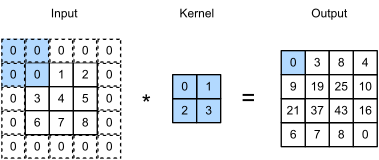
Since we typically use small kernels, for any given convolution we might only lose a few pixels but this can add up as we apply many successive convolutional layers. One straightforward solution to this problem is to add extra pixels of filler around the boundary of our input image, thus increasing the effective size of the image. Typically, we set the values of the extra pixels to zero. In :numref:img_conv_pad, we pad a
 🏷️
🏷️img_conv_pad
In general, if we add a total of
This means that the height and width of the output will increase by
In many cases, we will want to set
CNNs commonly use convolution kernels with odd height and width values, such as 1, 3, 5, or 7. Choosing odd kernel sizes has the benefit that we can preserve the dimensionality while padding with the same number of rows on top and bottom, and the same number of columns on left and right.
Moreover, this practice of using odd kernels and padding to precisely preserve dimensionality offers a clerical benefit. For any two-dimensional tensor X, when the kernel's size is odd and the number of padding rows and columns on all sides are the same, thereby producing an output with the same height and width as the input, we know that the output Y[i, j] is calculated by cross-correlation of the input and convolution kernel with the window centered on X[i, j].
In the following example, we create a two-dimensional convolutional layer with a height and width of 3 and (apply 1 pixel of padding on all sides.) Given an input with a height and width of 8, we find that the height and width of the output is also 8.
function comp_conv2d(conv2d, X)
    X = reshape(X, size(X)..., 1, 1)
    Y = conv2d(X)
    Y = reshape(Y, size(Y)[1:2])
end

conv2d = Conv((3,3), 1 => 1; pad = 1)
# `pad` kwarg tells equal number of rows/columns to be added at each side
X = rand(8, 8)
comp_conv2d(conv2d, X) |> size
(8, 8)When the height and width of the convolution kernel are different, we can make the output and input have the same height and width by setting different padding numbers for height and width.
conv2d = Conv((5,3), 1=>1; pad = (2, 1))
X = rand(8, 8)
comp_conv2d(conv2d, X) |> size
(8, 8)Stride
When computing the cross-correlation, we start with the convolution window at the upper-left corner of the input tensor, and then slide it over all locations both down and to the right. In the previous examples, we defaulted to sliding one element at a time. However, sometimes, either for computational efficiency or because we wish to downsample, we move our window more than one element at a time, skipping the intermediate locations. This is particularly useful if the convolution kernel is large since it captures a large area of the underlying image.
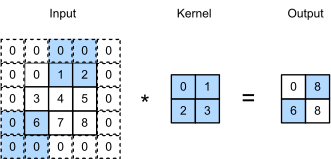
We refer to the number of rows and columns traversed per slide as stride. So far, we have used strides of 1, both for height and width. Sometimes, we may want to use a larger stride. :numref:img_conv_stride shows a two-dimensional cross-correlation operation with a stride of 3 vertically and 2 horizontally. The shaded portions are the output elements as well as the input and kernel tensor elements used for the output computation:
 🏷️
🏷️img_conv_stride
In general, when the stride for the height is
If we set
Below, we [set the strides on both the height and width to 2], thus halving the input height and width.
conv2d = Conv((3,3), 1=>1, pad = 1, stride = 2)
comp_conv2d(conv2d, X) |> size
(4, 4)Let’s look at a slightly more complicated example.
conv2d = Conv((5,3), 1=>1; pad = (0, 1), stride = (3, 4))
comp_conv2d(conv2d, X) |> size
(2, 2)Summary and Discussion
Padding can increase the height and width of the output. This is often used to give the output the same height and width as the input to avoid undesirable shrinkage of the output. Moreover, it ensures that all pixels are used equally frequently. Typically we pick symmetric padding on both sides of the input height and width. In this case we refer to
A similar convention applies to strides. When horizontal stride
So far all padding that we discussed simply extended images with zeros. This has significant computational benefit since it is trivial to accomplish. Moreover, operators can be engineered to take advantage of this padding implicitly without the need to allocate additional memory. At the same time, it allows CNNs to encode implicit position information within an image, simply by learning where the "whitespace" is. There are many alternatives to zero-padding. Alsallakh et al. [77] provided an extensive overview of those (albeit without a clear case for when to use nonzero paddings unless artifacts occur).
Exercises
Given the final code example in this section with kernel size
, padding , and stride , calculate the output shape to check if it is consistent with the experimental result. For audio signals, what does a stride of 2 correspond to?
Implement mirror padding, i.e., padding where the border values are simply mirrored to extend tensors.
What are the computational benefits of a stride larger than 1?
What might be statistical benefits of a stride larger than 1?
How would you implement a stride of
? What does it correspond to? When would this be useful?
Answers
Given the final code example in this section with kernel size
, padding , and stride , calculate the output shape to check if it is consistent with the experimental result. -> o_h = \lfloor (n_h - k_h + p_h + s_h) / s_h \rfloor o_h = \lfloor (8 - 3 + 0 + 3) / 3 \rfloor$ = 2 o_w = \lfloor (n_w - k_w + p_w + s_w) / s_w \rfloor o_w = \lfloor (8 - 5 + 1 + 4) / 4 \rfloor$ = 2 For audio signals, what does a stride of 2 correspond to? -> stride in context of audio signals is the sampling rate.
Implement mirror padding, i.e., padding where the border values are simply mirrored to extend tensors. ->
function mirror_padding(X; pad = 0)
    if isa(pad, Tuple)
        @assert length(pad) == ndims(X) "Provide padding for each dimension of X"
    end
    pad = isa(pad, Integer) ? collect((pad for i in 1:ndims(X))) : pad
    for dim in 1:ndims(X)
        X = cat(selectdim(X, dim, reverse(1:(pad[dim]))), X, dims = dim)
        X = cat(X, selectdim(X, dim, reverse((size(X, dim)-pad[dim]+1):size(X, dim))), dims = dim)
    end
    X
end
X = rand(3, 4)
3×4 Matrix{Float64}:
0.607324 0.622089 0.942666 0.123568
0.665525 0.617463 0.439721 0.569019
0.683353 0.430504 0.752825 0.564902mirror_padding(X; pad = 1)5×6 Matrix{Float64}:
0.607324 0.607324 0.622089 0.942666 0.123568 0.123568
0.607324 0.607324 0.622089 0.942666 0.123568 0.123568
0.665525 0.665525 0.617463 0.439721 0.569019 0.569019
0.683353 0.683353 0.430504 0.752825 0.564902 0.564902
0.683353 0.683353 0.430504 0.752825 0.564902 0.564902What are the computational benefits of a stride larger than 1? -> Stride larger than one implies less overlaps and thus less calculations and less memory
What might be statistical benefits of a stride larger than 1? -> Stride larger than 1 will ensure lesser correlation between the outputs in the hidden layer representation.
How would you implement a stride of
? What does it correspond to? When would this be useful? -> Stride of 1/2 is basically upsampling. It increases the number of samples. To implement this perhaps a better way would be to take 1/2 of the starting index and 1/2 of the end index and rest should be normal